 01
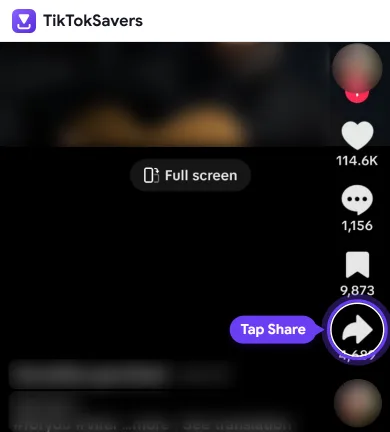
01Step 1: Tap Share
Open the TikTok app and find the video you want to save. Tap the Share button (arrow icon) on the right side of the video.
TikTok video downloader
Download your favorite TikTok videos online without a watermark in high quality (HD, 1080p), or save them as MP3 audio. Fast, secure, and 100% free with no apps or signup required.
Start a download
This is a photo post. It has no video, but you can save its sound as an MP3.
Only have a username? Find TikTok videos by username.
TikTokSavers is a free online TikTok saver and video downloader that helps you save TikTok videos without a watermark in HD quality. Whether you want to download TikToks in MP4 format or convert them to MP3 audio, our tool works directly in your browser on any device.
No apps or signups are needed. Just paste your TikTok link, choose your resolution (1080p, 720p, or MP3), and save your video in just a few seconds. From viral clips to trending sounds, TikTokSaver makes downloading 100% free and easy.
Step by step
You only need the TikTok video link. Follow these simple steps to download a high-quality video in seconds:
01Step 1: Tap Share
Open the TikTok app and find the video you want to save. Tap the Share button (arrow icon) on the right side of the video.
 02
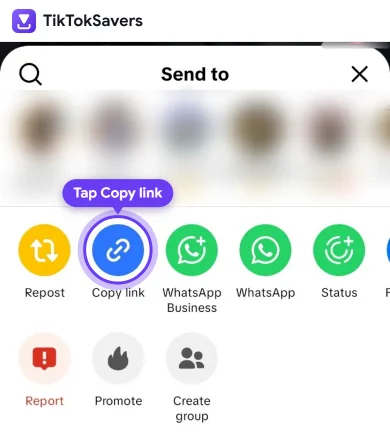
02Step 2: Copy the Link
In the share menu, tap "Copy link" to copy the URL. TikTokSavers supports available media from public videos.
 03
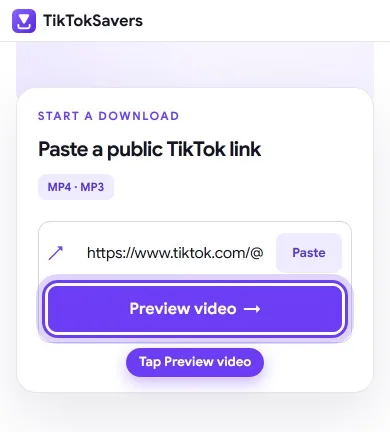
03Step 3: Paste it into the Box
Visit TikTokSavers.com and paste the TikTok link into the download box. Click "Preview video →" — our TikTok downloader will detect available formats, including HD video without a watermark and MP3 audio.
 04
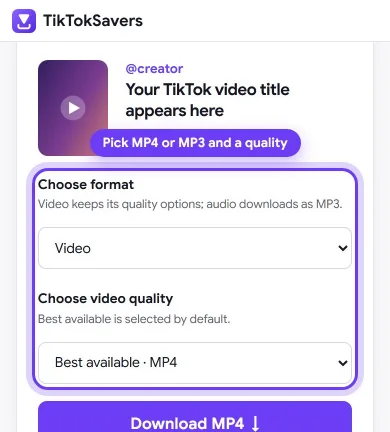
04Step 4: Pick a Format
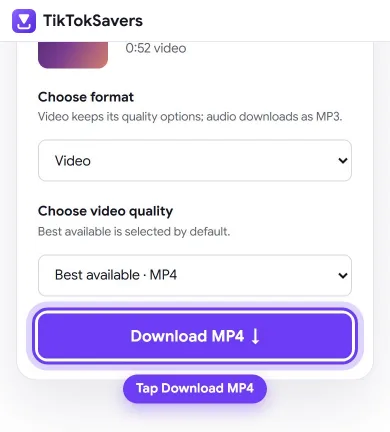
Choose your preferred resolution (1080p, 720p, 576p), HD video, or MP3 audio.
 05
05Step 5: Download
Tap the download button and save the file to your device instantly.
The whole process takes only a few seconds, depending on your internet connection and the length of the video. See the full visual guide for iPhone and iPad
Video quality
Not every TikTok post is uploaded in the exact same resolution. The quality you get depends on the source file, because our online TikTok video downloader provides the original available video format.
For a quick choice, 720p is usually enough for casual viewing, while a 1080p HD TikTok video download is better when you need a sharper copy for editing or offline playback.
720p Quality
Best for casual viewing and quick sharing. It takes lower storage space on your device.
1080p HD Quality
Best for video editing and watching on larger screens. It takes slightly higher storage space.
Original Quality
Best for getting the maximum source quality exactly as it was uploaded.
The watermark isn't just a logo; it's TikTok's username tag baked directly into the video file, which you can't simply crop out or remove with a standard video editor.
That's why using TikTokSavers, a free TikTok video downloader with no watermark HD tool, is especially important for creators saving their own content. Many people repost their TikToks to Instagram Reels or YouTube Shorts, and a visible TikTok watermark on another platform looks unprofessional and irrelevant.
Yes, absolutely! Our tool is completely safe. It doesn't ask for your TikTok login or any personal information. To download a TikTok video from a link, you only need to paste the public video URL.
The download process starts directly in a few seconds. No account gets created, and no video is stored on our servers after you have downloaded it.
For a normal public video download, the only input required is the TikTok post URL. When you use TikTokSavers, we only ask for the video link. You never need to provide your TikTok password, verification code, or account credentials.
A useful safety rule is simple: never enter your TikTok login details into a downloader website. If any tool asks for your password just to download a public video, stop and reconsider using it.
Features
Here are the top features that make our tool the best choice for downloading your favorite TikTok content:
Download clean TikTok videos without any logos or usernames. This makes your downloaded files perfect for post-editing, sharing, or republishing.
We deliver videos in the highest resolution available (up to 1080p). The video isn't compressed or re-encoded, so it looks exactly as it does on TikTok.
Easily download TikTok videos in MP4 format, or extract the audio and convert it directly to an MP3 file.
Whether you are using a mobile phone (iPhone/Android), a PC, or a tablet, our tool works seamlessly on any web browser.
Our online TikTok video saver works directly in your browser, so you can save supported public videos without installing extra software or apps.
You don't need to sign up, log in, or hand over personal details. We skip the TikTok login entirely, keeping your download history private and secure.
Along with standard videos, you can save the audio as MP3 and use our free TikTok tools to check profiles, follower counts, video stats, and even how old a TikTok account is.
Download as many videos as you want at lightning-fast speeds. There are no daily limits, no premium tiers, and it is completely free to use.
Any device
The process of downloading a video is very easy and works smoothly across all devices. The only small difference is how you copy the link depending on your operating system.
Open the TikTok app on your Apple device, tap the Share button on the video, and select Copy Link. Switch to Safari (or any browser), open TikTokSavers, paste the link, and hit download. Note for iOS users: By default, Safari saves downloaded files to your Files app in the "Downloads" folder. From there, you can easily open the video and save it directly to your Photos/Camera Roll.
Read the iPhone guideOpen the TikTok app, tap the Share icon, and choose Copy Link. Open Google Chrome (or your preferred default browser), visit our site, paste the link in the input box, and download. The high-quality MP4 file will automatically appear in your phone's Downloads folder or your Gallery app.
On a desktop or laptop, go to the tiktok.com website in your browser. Find the video you want, click the Share button, and copy the link. Paste it into our downloader box and click Download. The file will save straight to your computer's default "Downloads" folder. There is no software, extension, or account required for this process!
Read the PC guideTroubleshooting
Even simple online tools can run into small issues sometimes. If a link does not process on TikTokSavers, here is how you can easily fix the most common problems:
| Problem | Likely Cause | Fix |
|---|---|---|
| Nothing happens after pasting link | Link was not copied completely | Recopy link and make sure it starts with https:// |
| Download button does not respond | Video is private, deleted, or region-locked | Make sure the TikTok video is public |
| Downloaded file will not play | Browser blocked download or incomplete file | Check browser download settings and retry |
| No sound in downloaded video | Original video audio was muted/removed | Check original video on TikTok; if muted there, file will be muted |
| "Too many requests" message | Many downloads were started in a short time | Wait a minute, then try again |
Most TikTok downloaders do the same basic job, but they are often filled with annoying pop-up ads and confusing buttons. Our tool keeps everything clean and simple on one single page.
Just paste the link, pick your format, and download. There are no sign-ups, no spammy pop-ups, and it supports multiple formats, including HD video (MP4) and audio (MP3), all in one place.
Sometimes, a video link might not work. This usually happens if the video was deleted, made private, or restricted in your country. Additionally, TikTok allows creators to disable the download option for their posts.
If a creator has restricted their video, third-party tools cannot bypass those privacy settings. We respect user privacy and copyright rules, which is why TikTokSavers only processes public videos that are available to everyone.
Downloading your favorite TikTok content should be quick and easy. With TikTokSavers, you get a simple, free tool to save TikTok videos without a watermark in high quality. Whether you need HD MP4 clips for offline watching or want to extract viral MP3 audio tracks, our downloader does it instantly.
You don't need to install apps or sign up for an account. Our web tool works smoothly on iOS, Android, and PC browsers. Simply paste any public TikTok link, choose your format, and save the file directly to your device.
Use downloads responsibly
Only download videos you own or have permission to save. TikTokSavers does not host source videos and is intended for public links only.
FAQ
Yes, TikTok Saver is 100% free. There are no hidden charges, and we do not ask for any subscriptions. You can download an unlimited number of TikTok videos without any restrictions or daily download limits.
Absolutely. Our tool automatically removes the TikTok logo and username from the video. It also extracts the highest quality available, allowing you to save crisp, Full HD (1080p) videos exactly as they were uploaded by the creator.
No installation is required. Our tool is completely web-based. It works perfectly on all web browsers across every device, whether you are using an iPhone (iOS), an Android smartphone, a tablet, or a desktop computer (PC or Mac).
Getting the link is very simple. Open the TikTok app and find the video you want to save. Tap the Share button (the arrow icon on the right side of the screen), and then select Copy Link. You can now paste this link directly into our downloader box.
By default, the downloaded files go directly to your device's "Downloads" folder. If you are using an Android phone or a PC, you will find the MP4 file there. For iPhone or iPad users, Safari usually saves the files to your "Files" app, from where you can easily save them to your Photos or Camera Roll.
Yes! Besides saving standard MP4 videos, you can use our tool to extract the audio track and save it as a high-quality MP3 file directly to your device.
Yes. Open our TikTok Video Downloader with Username page, enter a username or profile link, and select Find videos. Choose a public video to preview and download.
Our platform is completely safe and respects your privacy. You do not need to create an account or log in to TikTok to use our service. Furthermore, we do not store your downloaded videos or keep a history of what you download. The file transfers directly to your device.
No, our tool cannot access or download content from private TikTok accounts. To respect user privacy and platform rules, we can only process and download videos that are set to public and are accessible to everyone.